The Show Yourself extension
Hover a link, a sender or an attachment: the extension shows who is really behind it, before you click. Free, with no account, and nothing leaves your computer.
For Chrome on a computer. Interface in English and French.
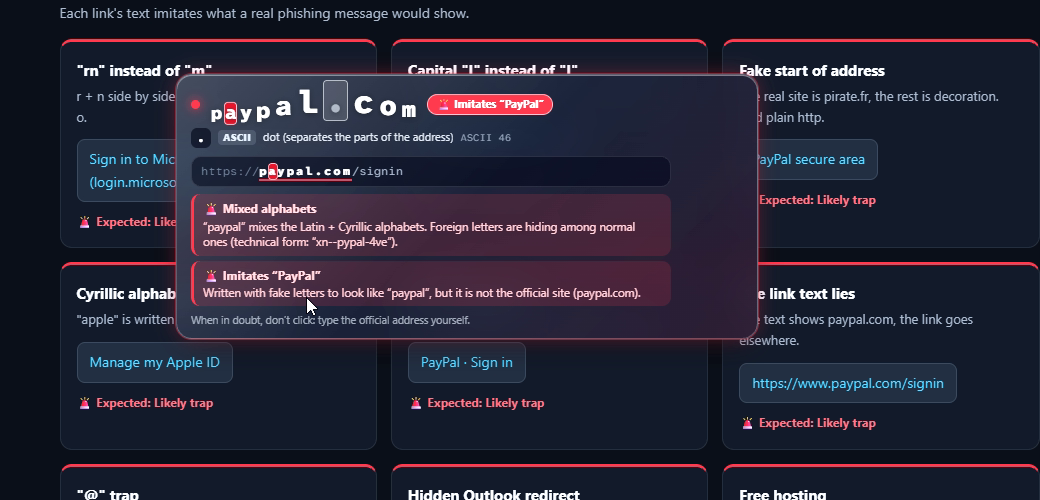
What it shows you
Links
Hover any link: its real destination appears, letter by letter. Look-alike letters from other alphabets, digits posing as letters and hidden redirects are revealed.
Senders
In your webmail, hover a sender’s name to see the full address behind it. A name that imitates a brand or an address is flagged.
Disguised files
Names like invoice.pdf.exe, or names flipped by invisible characters, are unmasked. A suspicious download is paused until you decide.
QR codes
Right-click an image to reveal the link hidden in a QR code, before you scan it.
Nothing leaves your computer
Every check runs inside your browser: no account, no server, no tracking. The code is public, so anyone can verify it.
Questions
- Is the extension free?
- Yes. Free, with no account and no ads.
- Does it send the pages I visit somewhere?
- No. The analysis runs entirely on your computer and nothing is sent, neither to us nor to anyone else.
- Does it block every scam?
- No tool does. It shows the facts (real domain, real sender, real file type) and warns about known tricks. When in doubt, do not click: type the official address yourself.
- Why does it need access to every site?
- Links, senders and attachments can appear on any page, so the extension has to see the element you hover. It reads nothing else.